Starlink for Boats: The Internet Setup We'd Run in 2026
Working from a boat used to mean planning your week around flaky marina WiFi. Starlink changed that, but the cruisers who actually hold a job afloat do not run one connection. They layer a satellite dish for anywhere, a cellular router for cheap low-latency coastal data, and a marina extender for the dock. The decision is which layers you need, and how you power them. We pulled Starlink's own Roam pricing, Peplink and GL.iNet spec sheets, and a weBoost gain rating, then cross-checked three-year liveaboard reviews and The Hull Truth's offshore threads. The number that reframes everything: a Starlink Mini draws roughly 20 to 40 watts at 12 volts, about 50 to 70 amp-hours a day, so a 100Ah lithium bank topped up by daily solar keeps it fed. That, not raw speed, is what makes the Mini the boat dish.
- 01 Starlink Mini (Roam Unlimited) , The default boat dish: 12V-native, IP67, handles daily video calls. About $249 hardware plus $175/mo.
- 02 Peplink MAX BR1 Mini 5G (B0DV53NN4Q) , Dual-SIM 5G router that auto-fails-over from Starlink so calls never drop. $407.
- 03 GL.iNet GL-MT3000 Beryl AX (B0BPSGJN7T) , Budget pick: turns flaky marina WiFi into a secure private network. $99.
- 04 Starlink Standard dish , Bigger antenna for large boats on shore power; faster, but needs an inverter or DC-DC supply. About $349.
- 05 weBoost Drive Reach 470154 (B07PDVTMM6) , Boosts a weak coastal cell signal for every device aboard at once. $500.
How they compare.
| Rank | Product | Best for | Price | Our score |
|---|---|---|---|---|
| 01 | Starlink Mini (12V-native, IP67, about $249 + $175/mo Roam)
Top Pick
| The default for working cruisers | $249
Buy → | 9.4/10 |
| 02 | Peplink MAX BR1 Mini 5G (B0DV53NN4Q, $407) | Cellular failover and redundancy | $407
Buy → | 9.0/10 |
| 03 | GL.iNet Beryl AX GL-MT3000 (B0BPSGJN7T, ~5,000 ratings, $99) | Marina WiFi on a budget | $99
Buy → | 8.6/10 |
| 04 | Starlink Standard (about $349, needs inverter or DC-DC) | Big boats on shore power | $349
Buy → | 8.3/10 |
| 05 | weBoost Drive Reach 470154 (B07PDVTMM6, 2,773 ratings, $500) | Coastal cell signal boost | $500
Buy → | 7.8/10 |
Prices are current Amazon prices at time of publication and can change. Scores reflect our editorial evaluation, not vendor input.
Our #1 pick: Starlink Mini (built-in WiFi router, IP67, 12V-native).
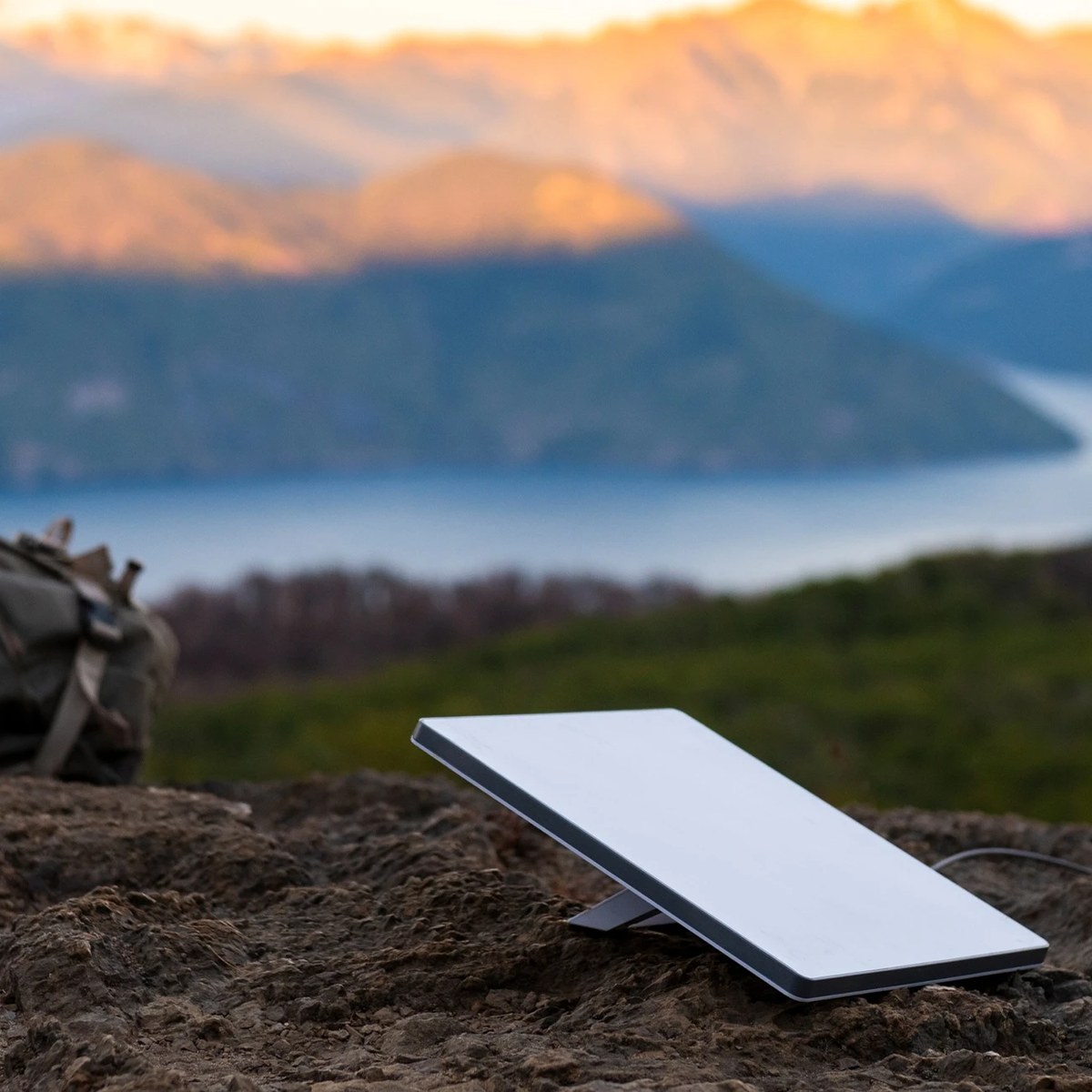
Starlink Mini (built-in WiFi router, IP67, 12V-native)
The dish that put a real office on a cruising boat.
Who it's for: The cruiser or liveaboard who has to keep a job, a client, or a class running from the boat. If you anchor out, hop between marinas, or make coastal passages and need dependable video calls, the Mini is the layer everything else hangs off. Its frugal 12V draw is what makes it livable on a sailboat's battery bank rather than a dockside hookup.
What we found: On Starlink's live Roam pricing, the work-aboard plan is Roam Unlimited at $175 a month; the metered 100GB ($55) and 300GB ($80) tiers throttle too fast for daily calls. The Mini holds roughly 25 to 50 milliseconds of latency, fine for Zoom or Teams; the real variable is jitter during satellite handoffs, which is exactly why we pair it with cellular below. Standard Roam stops working about 12 nautical miles offshore unless you switch on Ocean Mode and accept roughly $2 per gigabyte.
Bottom line: For about 95 percent of working cruisers the Mini is the right dish, light, low-power, and good enough offshore with the right mode. Buy the hardware direct from Starlink or West Marine; the Amazon listings are inconsistent third-party markups, so there is no honest affiliate link here. Spend the savings on a proper marine mount and heavier 12V cabling instead.
- + Runs natively on 12V at about 20 to 40 watts (roughly 50 to 70 amp-hours a day), so no inverter and easily solar-sustainable.
- + Handles several simultaneous video calls and ten-plus devices without slowing down.
- + IP67-rated against salt spray and rain, and sets up in minutes with a built-in router.
- + Works offshore with Ocean Mode switched on, not just coastal or at the dock.
- × SpaceX changes plan names and pricing often, so budget for moving targets.
- × Heavy tropical downpours cause brief drop-outs until the rain eases.
- × Smaller antenna than the Standard dish means lower peak speed; its built-in router is also only Wi-Fi 5, so heavy users run the Peplink or a third-party router for better belowdecks coverage.
Runner-up: Peplink MAX BR1 Mini 5G (dual-SIM + eSIM, 12V, B0DV53NN4Q).
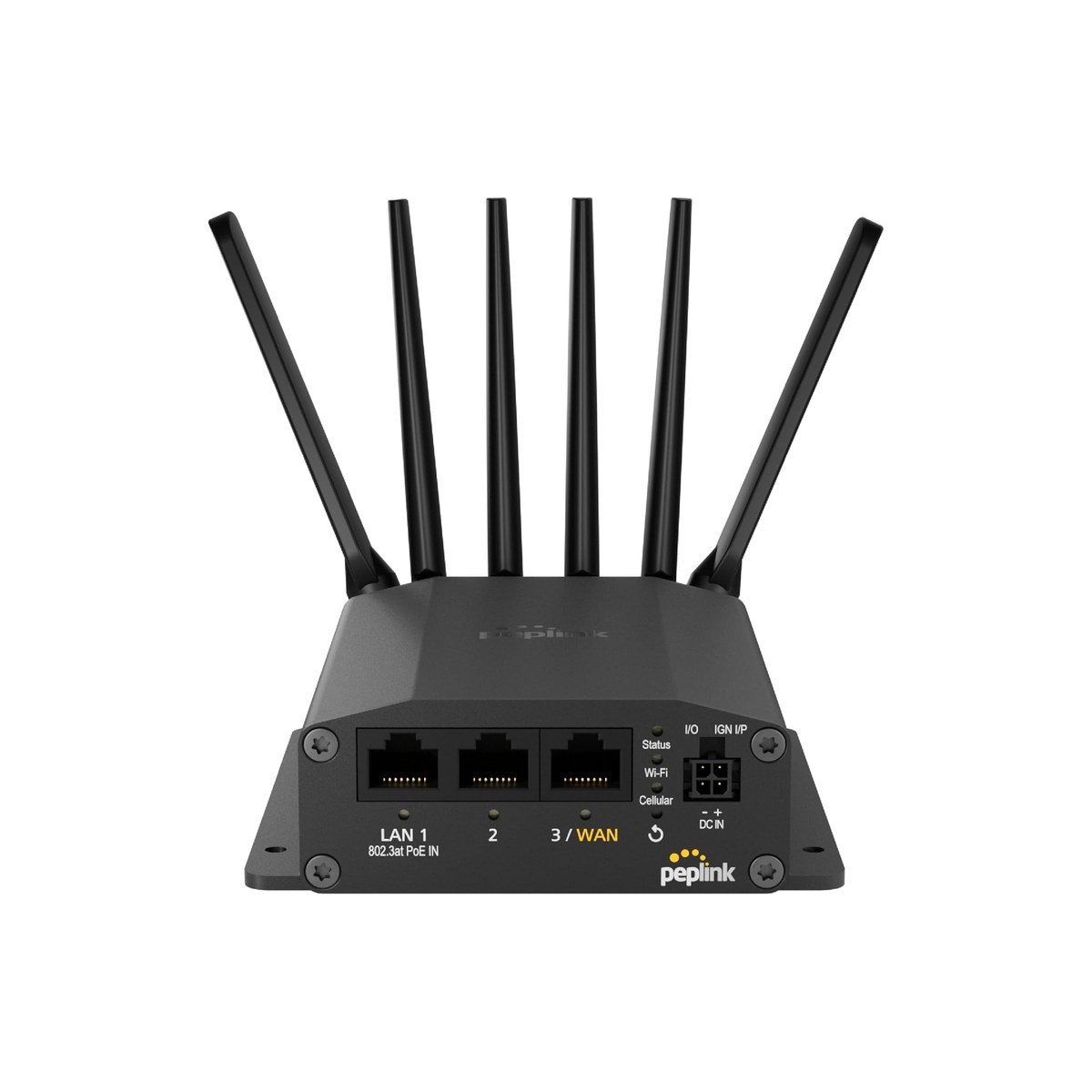
Peplink MAX BR1 Mini 5G (dual-SIM + eSIM, 12V, B0DV53NN4Q)
The cellular failover that keeps a call alive when Starlink blinks.
Who it's for: The liveaboard or remote worker whose income depends on the call connecting, cruising mostly within cell range. If you work coastal waters and the Great Loop more than open ocean, a dual-SIM cellular router is the layer that turns usually online into always online. It bonds or fails over between Starlink, two cellular carriers, and marina WiFi, so a rain-fade or a satellite handoff hands the call to LTE without you noticing. It is the redundancy half of the setup serious remote workers run.
What we found: The BR1 Mini 5G carries a Qualcomm X62 modem with 5G (NSA and SA) and CAT-20 LTE across Verizon, AT&T, T-Mobile and more, two physical SIMs plus a built-in eSIM, and Wi-Fi-as-WAN to absorb marina hotspots, up to about 300 Mbps in a rugged fanless metal case on 12V. Set WiFi as priority one and cellular as priority two and it fails over seamlessly the moment you leave dock range. Bonded with Starlink through SpeedFusion, both paths carry a call so neither a rain squall nor a handoff drops it. Real boaters report running the Great Loop on it without a failure.
Bottom line: At $407 it is the most expensive box here that you actually buy on Amazon, and it earns it for full-time workers. Pair it with an external marine cellular antenna, since the unit has no built-in cellular antenna gain, and budget for the paid PrimeCare license if you want to bond Starlink over the second Ethernet WAN rather than just fail over. The feature depth has a real learning curve versus a plug-and-play hotspot. Weekenders can skip it and lean on a phone hotspot.
- + Two SIM slots plus a built-in eSIM let you run two carriers and auto-pick the stronger signal.
- + Wi-Fi-as-WAN repeats marina WiFi, and the Ethernet WAN can bond Starlink for true redundancy.
- + 5G (NSA and SA) and LTE CAT-20, up to about 300 Mbps, in a rugged fanless metal case on 12V.
- + Real boater reviews report reliable use running the Great Loop without a failure.
- × Pricey, and bonding Starlink over the second Ethernet WAN needs a paid PrimeCare license.
- × No built-in cellular antenna gain, so pair an external marine cell antenna for best range.
- × Feature depth has a real learning curve versus a plug-and-play hotspot.
Budget pick: GL.iNet GL-MT3000 (Beryl AX) Wi-Fi 6 travel router (B0BPSGJN7T).
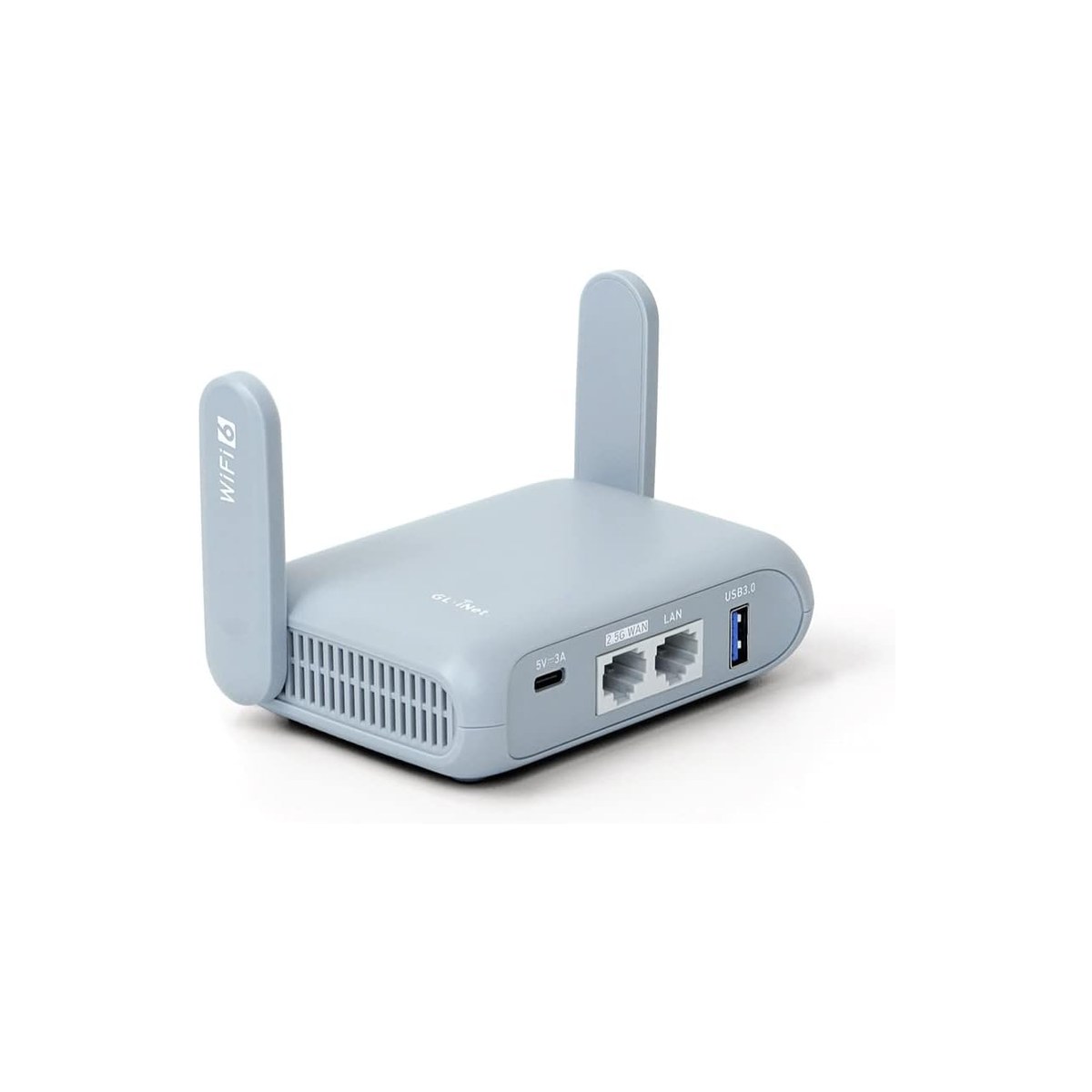
GL.iNet GL-MT3000 (Beryl AX) Wi-Fi 6 travel router (B0BPSGJN7T)
Turns captive, flaky marina WiFi into your own secure network.
Who it's for: The weekend cruiser, marina-hopper, or budget liveaboard who spends nights on a mooring or in a marina and just wants the dock WiFi to actually work on a laptop. It is also the right first box for anyone not ready to commit to a Starlink subscription, the one box here under a hundred dollars. Buy it as cheap insurance for the dock: it pulls in shore WiFi in repeater mode and rebroadcasts a private, VPN-protected network for all your devices.
What we found: The Beryl AX runs OpenWrt with a genuine repeater (WISP) mode, so it logs into the marina network once and hands a clean, private SSID to your whole boat while built-in WireGuard and OpenVPN keep the connection encrypted on a network you do not control. Wi-Fi 6 (574 plus 2402 Mbps) and a 2.5GbE WAN port mean it is not the bottleneck; the marina is. It also tethers a phone hotspot as a fallback WAN, runs off USB-C or 12V, and rates 4.6 stars across roughly 5,000 ratings.
Bottom line: At $99 it is the cheapest meaningful upgrade to boat internet you can buy, and it pairs with everything above. Treat it as the marina-and-offload layer, never your sole work connection, because marina WiFi is famously oversubscribed and the unit is only as good as the WiFi it repeats, so no help at anchor or offshore. Stock internal antennas have limited reach; a USB high-gain antenna helps distant docks. If you want more dock range, step up to the GL.iNet Slate AX at about $120.
- + WISP repeater mode captures marina or shore WiFi and rebroadcasts it as a stable private network.
- + Wi-Fi 6 (574 plus 2402 Mbps), a 2.5GbE WAN port, and USB tethering from a phone hotspot.
- + Built-in WireGuard and OpenVPN protect your work traffic on untrusted dock networks.
- + Pocket-sized, runs off USB-C or 12V, and rates 4.6 stars across roughly 5,000 ratings.
- × Only as good as the marina WiFi it repeats, so no help at anchor or offshore.
- × Stock internal antennas have limited reach; a USB high-gain antenna helps distant docks.
- × Not a primary work connection on its own; it is the offload layer, not the backbone.
Also worth considering.

Starlink Standard (flat-panel dish plus separate router)
The bigger dish for large boats and shore-power liveaboards.
Who it's for: Bigger boats and full-time dock liveaboards who want the strongest signal and widest belowdecks WiFi, and who are not rationing amp-hours at anchor.
What we found: The Standard's larger flat-panel antenna delivers higher peak throughput and better WiFi penetration than the Mini, but it ships with a separate router, draws roughly 75 to 100 watts (100 watts-plus on peaks), and does not run natively on DC, so you need an inverter or a DC-DC supply. That is roughly double the Mini's daily amp-hour burden, a real cost on a battery bank.
Bottom line: For most cruisers the Mini wins on power alone, and the forum consensus is that the Mini covers about 95 percent of use cases. Choose the Standard when you are on shore power or carry the battery and solar to feed it. Buy direct from Starlink and budget for the inverter and heavier cabling.
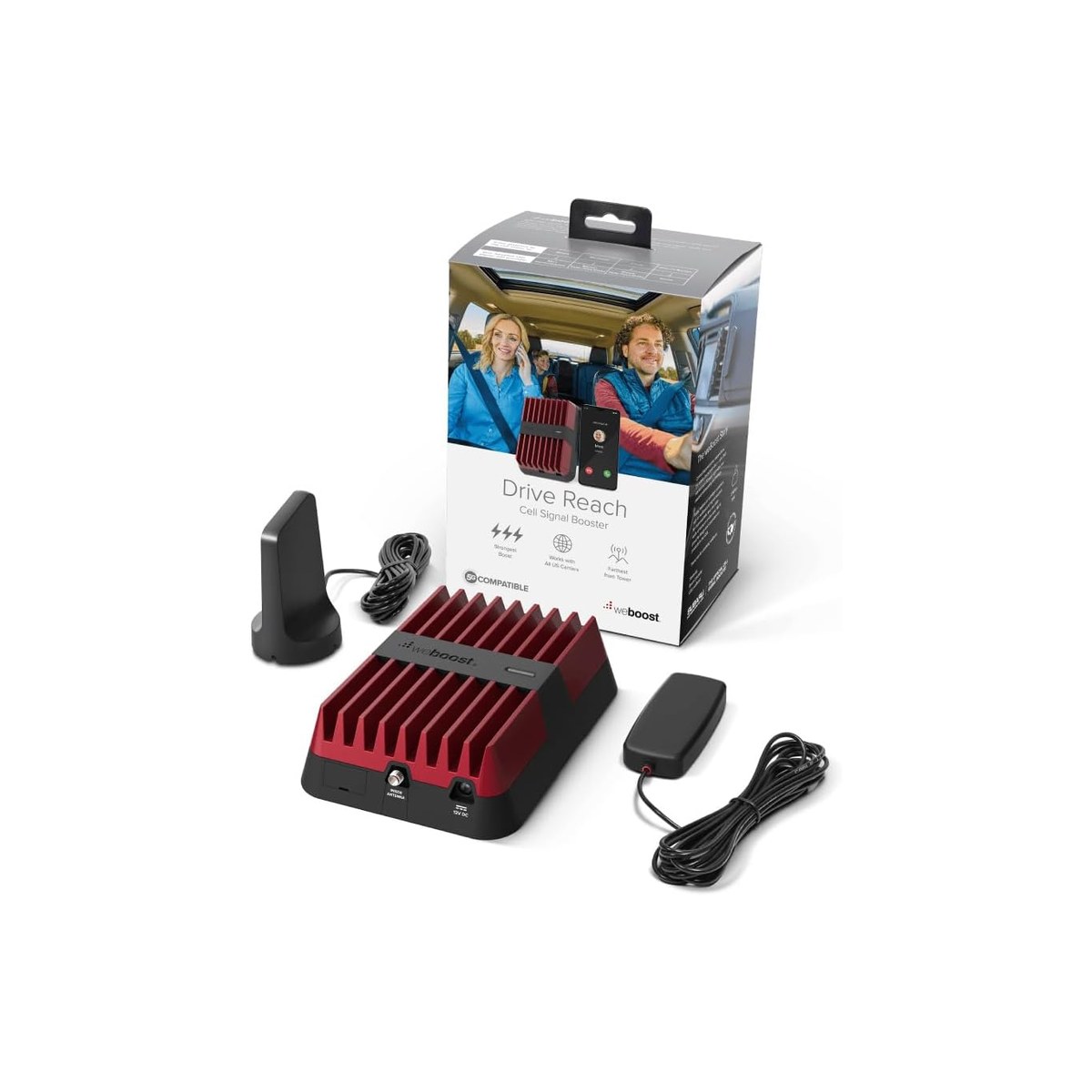
weBoost Drive Reach cell booster (470154) plus marine antenna
Squeezes more bars from a weak coastal cell signal.
Who it's for: Coastal and Loop cruisers who get one or two bars at anchor and want to turn that into a usable connection for the whole boat, without buying a router and a second SIM plan.
What we found: The Drive Reach is an FCC-max 50dB booster with strong uplink power, rated for roughly twice the reach toward a distant tower across all US carriers on 4G LTE and sub-6 5G (it does not cover T-Mobile's n41 mid-band, so check your carrier's bands), and it boosts every phone and hotspot aboard at once. The catch is physics: a booster amplifies a weak signal but cannot create one where there are zero bars, so it is a coastal range-extender, not an offshore fix. For a boat you pair the vehicle unit with a weatherproof marine omni antenna and RG-58 cable.
Bottom line: At $500 for the booster (antenna and cable extra) it is a niche but genuinely useful add-on for cell-dependent coastal cruisers. Mount the outdoor antenna clear of the crew and keep the inside and outside antennas well apart so they do not feed back (the manual gives the separation), and site it away from the Starlink dish. If you already run a Peplink with an external antenna, you likely do not need this too.
Skip this guide if...
You might not need a dedicated boat-internet setup at all. If you daysail close to home, stay in cell coverage, and never work from the water, your phone's hotspot on an unlimited plan covers most of what these systems do for a fraction of the cost; add the $99 GL.iNet only if marina WiFi is part of your routine. Starlink earns its subscription when you anchor out, cruise beyond reliable cell range, or genuinely depend on the connection for income. Buying a full satellite-plus-cellular stack for occasional weekends is over-buying. Start with the phone and the extender, and add the dish when your cruising actually outruns the cell network.
Don't bother with.
- × Skip Legacy marine VSAT and Inmarsat systems (KVH and similar, $5,000-plus hardware)For a cruiser they cost thousands up front and hundreds to thousands a month for a fraction of Starlink's speed. Unless you are a commercial vessel needing a guaranteed service level, they are obsolete.
- × Skip Relying on marina WiFi alone for workMarina networks are oversubscribed, captive-portalled, and drop constantly. Fine as a data-offload bonus through the GL.iNet, never as your primary work connection.
- × Skip The older weBoost Drive 4G-X Marine bundle (470510, ASIN B07P13KG13)It is the previous 4G-only generation and is currently unavailable on Amazon. Buy the current Drive Reach booster and a marine antenna as components instead.
How we picked.
We built this guide for one specific reader: the person trying to keep a job, a business, or a client afloat. That reframes everything. A weekender wants the cheapest box that streams Netflix at the dock; a remote worker needs a connection that survives a rain squall in the middle of a client call. The whole lineup is organized around reliability and power budget, not headline speed.
Boat internet in 2026 is a three-layer stack, and the most common mistake is treating it as a single purchase. Layer one is satellite (Starlink) for anywhere, including offshore. Layer two is cellular (a router like the Peplink, or a booster like the weBoost) for cheaper, lower-latency data within sight of land. Layer three is a marina WiFi extender (the GL.iNet) for the dock. Almost nobody who works aboard relies on a single layer; the serious ones run satellite primary with cellular failover.
The pivot that decides the whole guide is power, not speed. A Starlink Mini draws roughly 20 to 40 watts at 12 volts and runs natively on DC, which works out to about 50 to 70 amp-hours a day, a load a 100Ah lithium bank and a couple of solar panels keep up with in decent sun. The Standard dish roughly doubles that and needs an inverter or DC-DC supply. On a boat the dish you can actually keep powered beats the dish with the higher peak speed every time, which is why the Mini is our top pick over the bigger antenna.
Plans matter as much as hardware. As of mid-2026, Starlink's Roam tiers are 100GB at $55, 300GB at $80, and Roam Unlimited at $175 a month; only the Unlimited plan makes sense if you take daily video calls. Standard Roam covers coastal and inland waters but stops working about 12 nautical miles (roughly 14 statute miles) offshore unless you toggle Ocean Mode and pay about $2 per gigabyte of priority data. Two caveats matter offshore: Ocean Mode is only on Roam Unlimited (not the 100GB or 300GB tiers), and you must switch it on before you cross the 12-nautical-mile line, because once you are disconnected you cannot reach Starlink to flip it. Roam is also coastal-only under its terms (a cap of roughly 60 days a year within 12 nm), so anyone working full-time offshore belongs on Starlink Maritime, not Roam. SpaceX changes these names and prices often, so confirm the current figures on Starlink before you buy.
For the cellular layer we favored a real router over a phone hotspot because of failover. A dual-SIM router like the Peplink MAX BR1 Mini 5G watches multiple connections and switches between them automatically; bonded with Starlink through SpeedFusion, both paths carry a call so a satellite handoff never drops it. A signal booster like the weBoost solves a different problem, strengthening an existing weak cell signal but never manufacturing one where there are no bars.
Latency and jitter, not raw download speed, are what make or break working afloat. Starlink runs about 25 to 50 milliseconds of latency, which is fine for Zoom, Teams, and Meet. The variable is jitter: brief spikes during satellite handoffs or obstructions that can choppy up a call. That single fact is the argument for the cellular failover layer, and it is why we did not simply rank the lineup by megabits.
Installation is where boat internet quietly fails. Mount the dish with a clear view of the sky, away from the boom, radar arch, bimini, and rigging that cast obstruction shadows. Size the 12V wiring and fuse for the roughly five-amp startup surge, not the lower running draw, and use 14-gauge or heavier wire for runs over about fifteen feet; on a battery that sags below about 12.5 volts under load, a small step-up converter is close to mandatory so the dish does not drop at cold start. For a cellular booster, the real install rule is antenna separation, not distance from people: mount the outdoor donor antenna clear of the crew and well away from the inside rebroadcast antenna so the two do not feed back, per the booster's manual.
Finally, search terms. People shop this category as starlink for boats, boat wifi, satellite internet for boats, starlink mini for boat, and marine wifi router, and the picks here map to all of them: the Mini and Standard answer the satellite and Starlink queries, the Peplink and weBoost answer the cellular ones, and the GL.iNet answers the WiFi-extender ones. The honest through-line is that no single product is boat internet; the setup is the answer.
FAQs.
Q01 How much does Starlink for boats cost?
+
Q02 Will a Starlink Mini run my boat for working remotely?
+
Q03 Do I really need a cellular router if I have Starlink?
+
Q04 Does Starlink work offshore?
+
Q05 How much power does Starlink draw on a boat?
+
Q06 Why is the Mini your top pick over the Standard dish?
+
Q07 Can a cell booster like weBoost get me internet offshore?
+
Q08 Is marina WiFi enough to work from a boat?
+
Q09 Can I buy Starlink on Amazon?
+
Q10 What is the cheapest way to get internet on a boat?
+
If you, then this.
- IF You work aboard and cruise coastal, at anchor, or offshoreGET Starlink Mini on Roam Unlimited$249 + $175/mo →
- IF You cannot afford a dropped call and want cellular failoverGET Peplink MAX BR1 Mini 5G$407 →
- IF You want cheap insurance for flaky marina WiFiGET GL.iNet Beryl AX (GL-MT3000)$99 →
- IF You have a big boat on shore power and want peak speedGET Starlink Standard dish$349 →
- IF You cruise coastal and need more bars from a weak cell signalGET weBoost Drive Reach (470154)$500 →
Boat Gear: The Complete Guide
The whole-boat picture →Every system on a 20 to 45 ft coastal boat, organized in one place, with the one guide we trust for each.
- Starlink Roam plans and coverage (US) · Starlink / SpaceX
- Peplink MAX BR1 Mini 5G specifications · Peplink
- GL.iNet GL-MT3000 (Beryl AX) specifications · GL.iNet
- weBoost Drive Reach booster (gain and bands) · weBoost
- Starlink for boats: a three-year liveaboard review · Travel Sketch Sailing
- How well does Zoom work on Starlink? (latency and jitter) · SatelliteInternet.com